Links nobody clicked
Loopback and .local hosts, staging subdomains, http where you meant https, broken percent-encoding, redirect chains you didn't know existed.
Send is the one button you can't take back. Email Link Checker runs deterministic QA against the email you already have open in Gmail or the supported Mailchimp and Klaviyo editors: broken and redirecting links, missing UTMs, merge tags that never resolved, the placeholder someone forgot to replace.
Free public beta — every feature unlocked, no account, no payment. Coming to the Chrome Web Store.
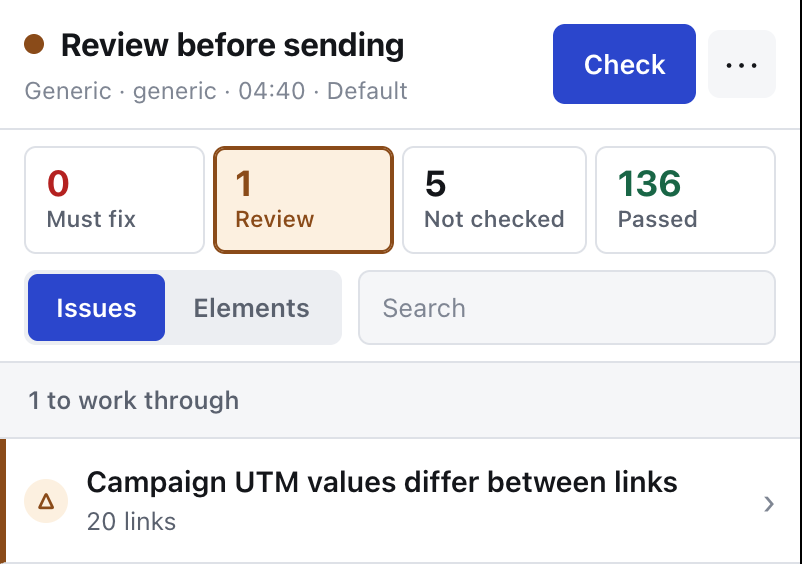
utm.consistency on a real campaign: 136 checks passed, one warning covering all twenty links.A staging URL that survived the last review. A hero image that never loads because the source is still relative. Hi {{ first_name }} going out to forty thousand people. None of it is hard to spot — it's just hard to spot at 6pm, in a preview pane, on the third revision of a campaign you've read too many times.
Loopback and .local hosts, staging subdomains, http where you meant https, broken percent-encoding, redirect chains you didn't know existed.
One link with utm_campaign, the next without. Two spellings of the same source. Reporting you can't trust a week later, when it's too late to fix.
Unresolved merge tags, foreign template syntax from the last ESP, lorem ipsum in a footer, an empty subject line, an unsubscribe link with no destination.
Every group is a fixed set of rules that runs in a fixed order, so the same email always produces the same report. Each finding carries the rule, the status, the evidence it found and a pointer back to the element in the email.
Destination status and redirect chain, insecure http, malformed percent-encoding, loopback and .local hosts, non-production environments, domains outside your allowlist. Redirect chains are bounded by count and by time, and a failure of the checking service never looks like a 404 on your link.
Required parameters, query integrity, allowed values, and consistency across the whole email. On a delivered message the UTM check reads the confirmed final URL after the ESP wrapper instead of guessing.
Unresolved tokens, template syntax that belongs to another ESP, leftover conditional control markup, and the orphan punctuation an empty substitution leaves behind.
Copy placeholders, reserved example domains, empty subject, missing preheader, CTAs with no label or no destination, image sources that are empty, local, relative or mixed-content, linked images with nowhere to go, and HTML weight against Gmail's clipping budget.
Missing, empty, filename-like or over-long alt text, generic link names, a missing language attribute, a skipped heading level. Concrete findings only — no aggregate accessibility score, and the group can be switched off in the profile.
English spelling against a dictionary bundled with the extension, plus the brand terms you configure. Nothing about your copy is sent anywhere to be checked.
Send a test to a short-lived address and the extension analyses the message that actually arrived: final MIME, final links after wrapping, cryptographic DKIM verification, the trusted receiving-MTA SPF result where one is available, and DMARC alignment. A DNS failure is reported as unverifiable, not as a sender defect.
Desktop (720px) and mobile (390px) browser previews in a sandbox with scripts and remote resources blocked, reporting horizontal overflow, content hidden by HTML or inline CSS, and client-sensitive CSS. They are browser previews, and they say so.
The fastest way to lose your trust is to say "all clear" right before something irreversible. So every rule returns exactly one of four statuses, and only one of them means the rule really ran.
A defect the rule proved on real data: a link pointing at this computer, an empty subject, an unsubscribe link with no destination.
Real, but a judgement call: http instead of https, a domain outside your allowlist, a missing alt, a misspelling.
Allowed only when the rule completed against real data. An empty result is not a pass, and a rule with nothing to look at does not get one.
The editor didn't expose the subject, the preview was incomplete, the URL service didn't answer. You get told, instead of getting a green tick you can't rely on.
The verdict reads ready only when the snapshot is complete and there is no critical, no warning and nothing unverifiable left. Otherwise it says fix-required, review-required or incomplete. There is no numeric score.
If the platform's preview couldn't be read fully, the whole report is marked incomplete and the counters refuse to show a green total.
Link coverage is enforced by a test in the repository, not by good intentions: a link can't quietly fall out of the run.
Clicking a finding highlights the element it came from, matched by structural path plus content fingerprint. If that exact element can't be found again, nothing is highlighted — a similar-looking one is never substituted.
The scan runs in your browser and starts only when you press Check — there is no background scanning. The HTML, subject, preheader, visible copy and the normalized snapshot stay on your machine. What leaves the browser is a short, deliberate list, and it's written down.
Unsubscribe, preferences and one-time-token links are dropped before a request is ever created — the extension does not visit destructive endpoints. It reads the email you point it at: never your inbox history, never other messages, and it can't send, schedule or edit a campaign.
Email QA is a market full of promises nobody can keep. Here is the list we've decided not to make, so you never have to work out which parts of the report to believe.
We claim a platform only when a working adapter ships for it. Today that means Gmail plus the supported Mailchimp and Klaviyo editors, with a generic workflow for an email you select on any other page.
The previews are sandboxed browser previews at two viewports. They don't reproduce Outlook, Gmail or any native client's rendering engine, and the report says so in place rather than in a footnote.
No spam-folder prediction, no number between 0 and 100, no promise about where your email lands. Authentication findings are DKIM, SPF and DMARC facts about the message that arrived — nothing more.
No LLM, no heuristic scoring, no subjective verdict on your writing. Deterministic rules, evidence you can read, and the same answer every time you run it.
In Gmail and in the supported Mailchimp and Klaviyo editors, where a platform adapter finds the email preview and tells the rules what the platform doesn't expose. On any other page there's a generic workflow for an email you select yourself. We add a platform to this list when its adapter works, not when the marketing page is ready.
No. HTML, subject, preheader, visible copy and the normalized snapshot stay in the browser. Only eligible destination URLs go out for status and redirect checks, and only bounded DKIM and DMARC DNS query names go out for authentication. The full list is in the privacy policy.
No. The analyzer is a deterministic rule engine: the same snapshot always produces the same report. No LLM, no heuristic scoring, no subjective copy assessment. That's a rule of the project, not a phase.
Because the rule couldn't run on real data — the editor didn't expose the subject, the preview came back incomplete, the URL service didn't answer. Passed is reserved for rules that actually completed on real data, so missing information can never turn into a green tick.
Yes, through the optional Test Inbox. You or your ESP send a test to a short-lived address; the extension downloads the delivered raw message over HTTPS, analyses it locally, and doesn't keep it. It checks final links, UTMs after ESP wrapping, DKIM signatures, the receiving MTA's SPF result where one is available, and DMARC alignment. The service accepts at most 10 MiB, stores that temporary message encrypted at rest, and makes it inaccessible after the one-hour retention it shows you.
Never. Unsubscribe, preferences and links that look like one-time-token actions are filtered out before any request is created. Automatically visiting destructive endpoints is forbidden by design, which is also why an unsubscribe link in an editor preview can end up unverifiable rather than passed.
Four at install — activeTab, scripting, sidePanel and storage — plus one narrow host permission for its own service. The Gmail, Mailchimp and Klaviyo origins are optional and requested only when you scan one of those platforms. There is no <all_urls>, and Manifest V3 means no remotely hosted code.
Yes, and only on purpose. Creating a shared report needs a scope confirmation first, and it uploads only critical, warning and unverifiable findings. Email HTML, passed details, DOM references, recipient-token values and unsubscribe or preferences URLs are omitted or redacted. The page is noindex, lives for 24 hours, and can be deleted immediately.
Every status, every term and every check, with what to do about it. Read it before you install anything — it's the fastest way to see exactly how far this extension goes and where it stops.
The beta is free: everything unlocked, no account, no payment. When a check gets it wrong, say so on the feedback page — it reaches the developer directly.