Email Link Checker

Handbook

Every status, every check, every term the report can show you — and what to do about each one. The extension is deterministic: the same email always produces the same report, and nothing here is a guess or a score.

Last updated 30 August 2026

Section 1

How to read a report

You press Check. The extension takes a snapshot of the email currently open in your tab — links, images, headings, visible text, subject and preheader where the platform exposes them — and runs a fixed set of deterministic rules against it. The report opens in the Chrome side panel.

Every line in the report is a finding, and every finding carries four things:

  • A rule. The identifier, like link.environment, tells you which check produced the line. Rule identifiers are stable and are listed in this handbook.
  • A status. One of critical, warning, passed or unverifiable. Nothing else exists.
  • Evidence. The actual thing that was found — the raw href as written in the email, the parameter, the misspelled word, the position of a broken escape sequence.
  • A pointer back to the element. Clicking a finding highlights the exact element in the email. The match is exact: the panel resolves the element by structural path plus a content fingerprint, and refuses to highlight a similar-looking element instead.
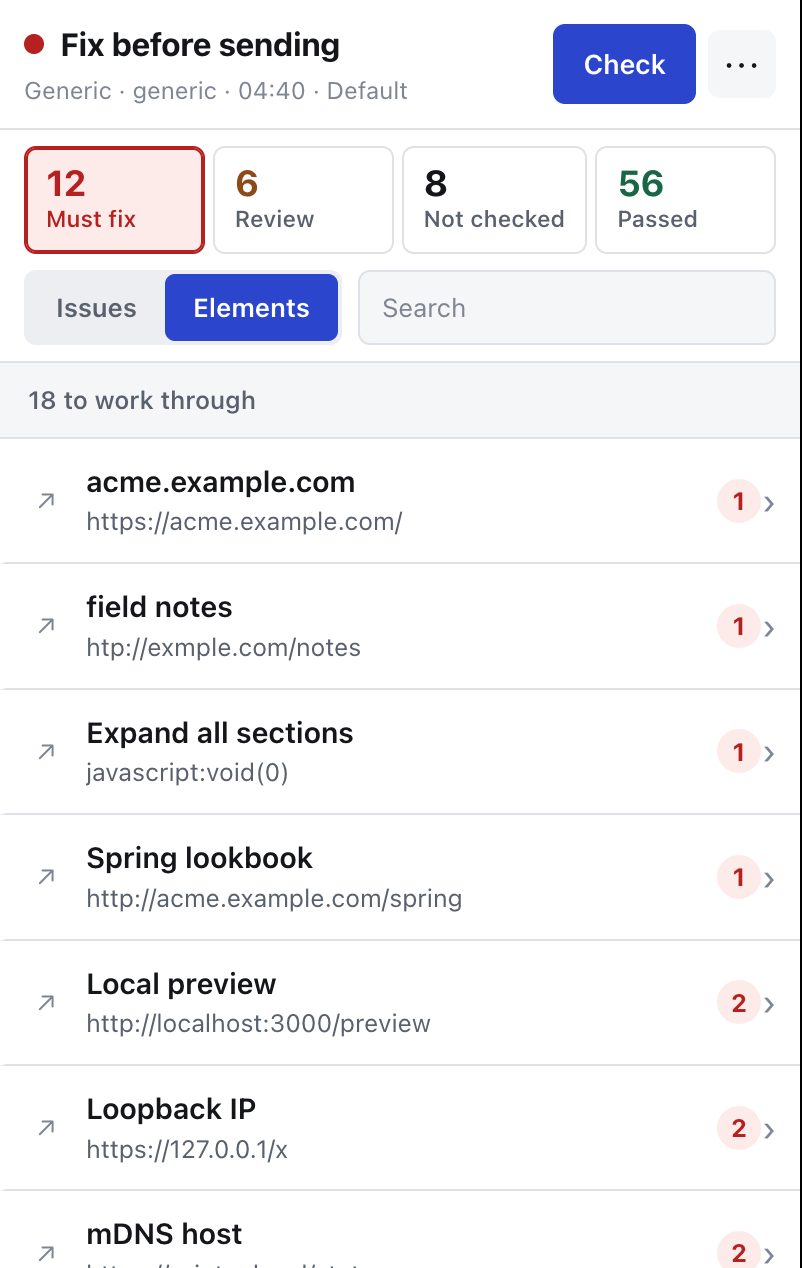
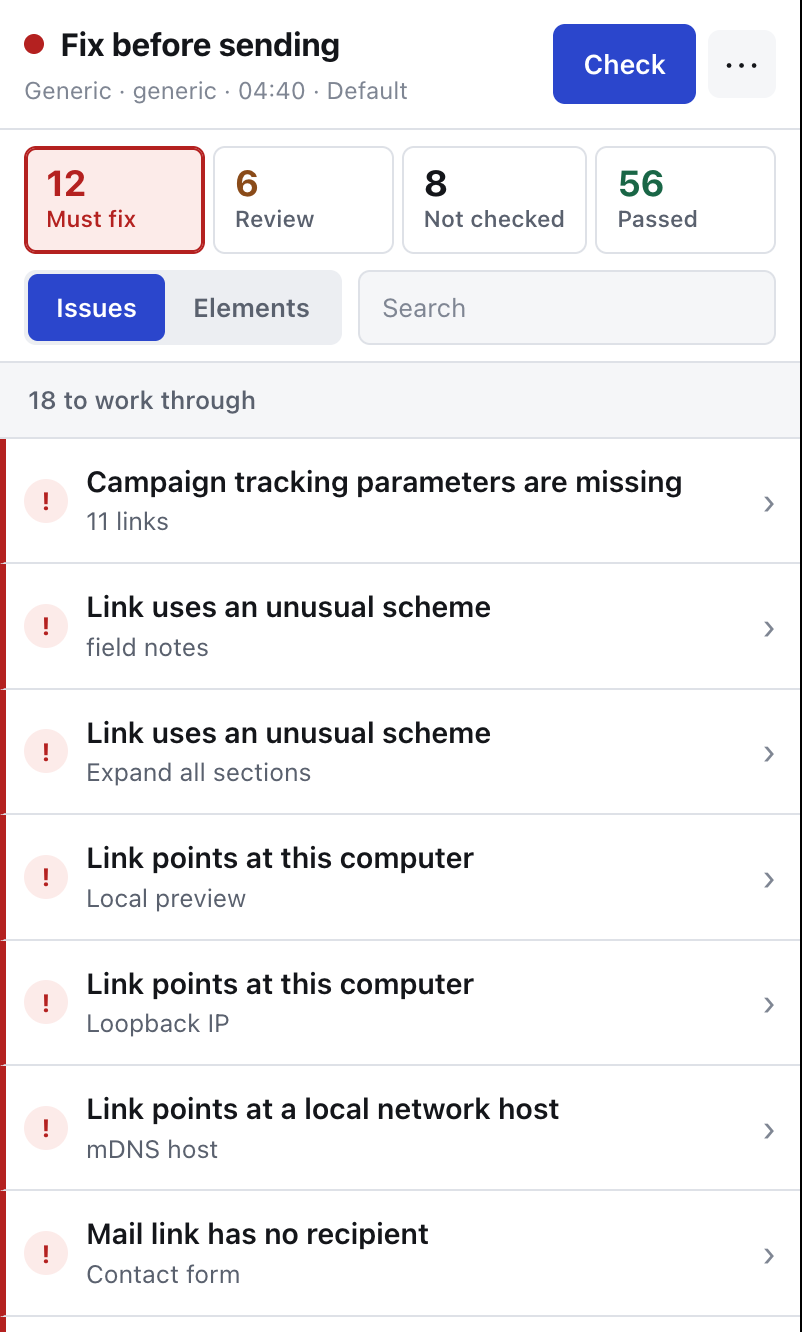
Side panel showing the verdict, four counters and the list of findings for a sample email.
The report: one verdict, the four counts, and every finding in one list.
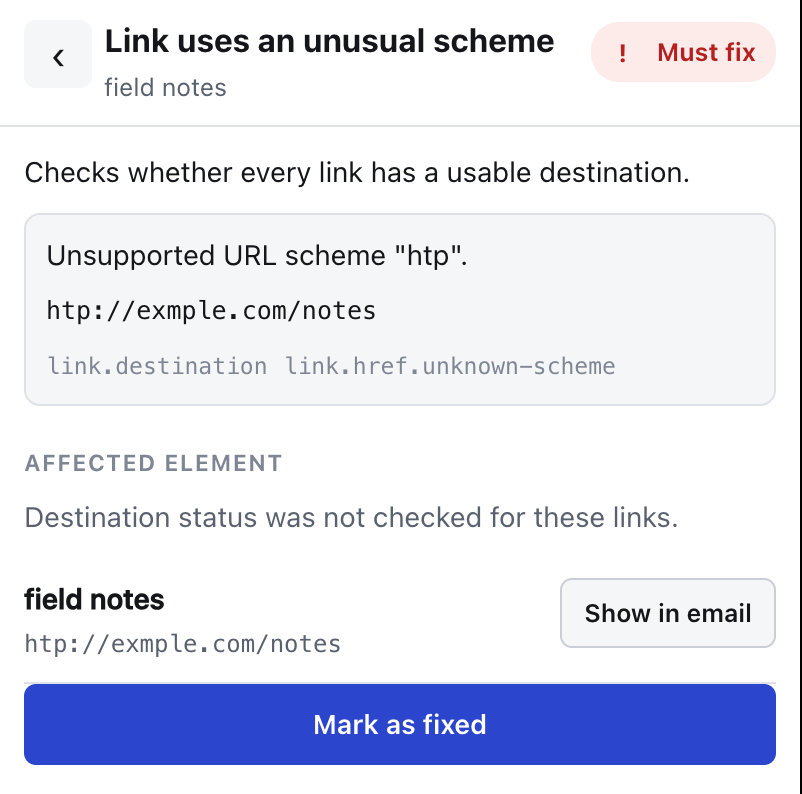
One finding opened, showing the rule explanation, the evidence and the affected element.
One finding opened — what the rule checks, the evidence exactly as written in the email, and the element it points at.

Every screenshot on this page is the panel itself, running on sample emails.

The list is shown in full, with no accordions and no pagination, ordered critical → warning → unverifiable → passed. Findings that describe the same fact across many links are collapsed into one line with the affected links attached, so a campaign missing utm_source on forty links produces one finding, not forty.

There is no score. There is no percentage. An opaque aggregate number would let a broken email look 92% fine, and that is exactly the failure this tool exists to prevent.

Section 2

The four statuses

A rule returns exactly one of these. The distinction between the last two is the whole point of the product.

The panel counts them under plainer labels — Must fix, Review, Not checked and Passed — while the status names below are what the export, the shared report and this handbook use. Same four things, named for the screen in one place and for the record in the other.

critical

Something is broken · shown as “Must fix”

The rule ran on real data and found a defect that will affect recipients: a link that leads nowhere, a merge tag that survived into a delivered message, a duplicated UTM parameter, an empty subject. Fix it before sending.

warning

Something needs a human decision · shown as “Review”

The rule ran and found something that is probably wrong but can legitimately be intentional: an http:// link, a staging host, an inconsistent campaign value, a generic link name, a suspected misspelling. You decide.

passed

The rule actually verified it · shown as “Passed”

passed is only allowed when the rule really executed against real data and the data satisfied it. An empty result is never a pass. A rule that had nothing to look at does not get to say the email is fine.

unverifiable

The check could not be completed · shown as “Not checked”

Data was missing, a platform did not expose a field, a profile setting was absent, or a service did not answer. Missing data is unverifiable — never passed. This is the status other tools quietly turn green.

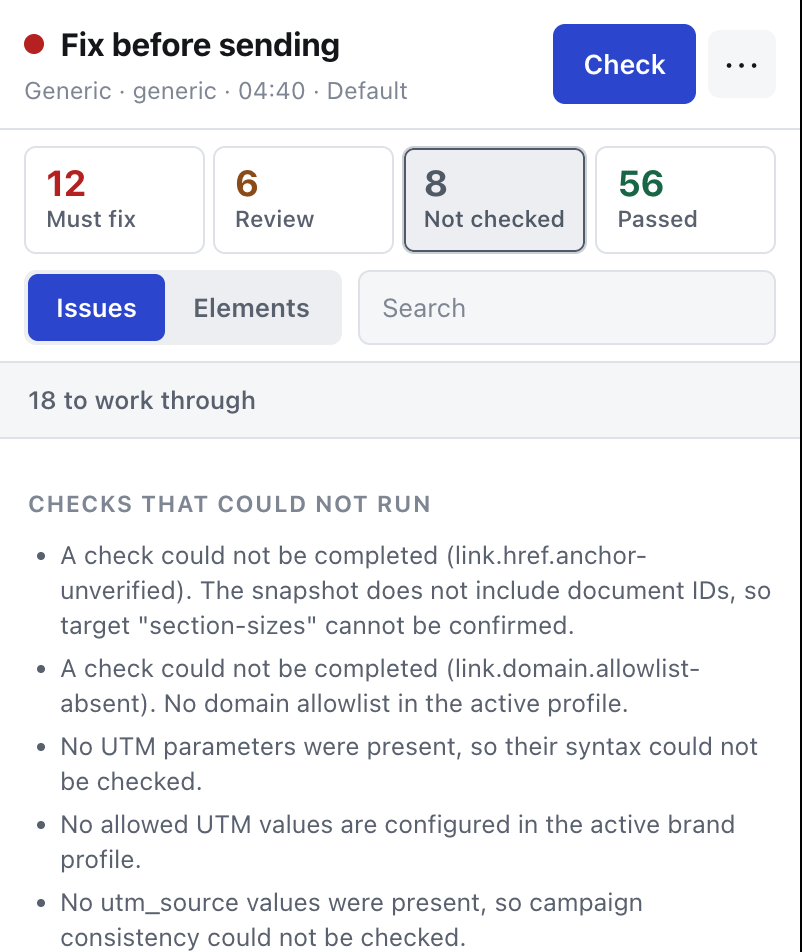
The Not checked filter listing the checks that could not run and why.
“Not checked” is a list you can read: every check that could not run says which rule it was and what was missing.

Two rules that follow from this

An incomplete snapshot cannot produce a green report. If an adapter fails, an artifact is truncated, an iframe is unreachable or the DOM was captured mid-change, the whole report is marked incomplete and the aggregate counts do not show a green result.

A checker failure and a 404 are never merged. If the URL status service times out, is offline, is rate limited or returns a contract violation, the finding is unverifiable and says so. If the target itself answered with 404, that is a real answer about your link and the finding is critical. These two outcomes never collapse into one status, because "we could not reach the checker" and "your link is dead" require completely different actions from you.

Section 3

The four report verdicts

Above the list, the panel shows one verdict for the whole report. It is computed from the finding counts and the completeness flag, in this order:

  • fix-required — "Fix before sending." At least one critical finding exists. This wins over everything else, including incompleteness.
  • incomplete — "Check incomplete" (or "Review before sending" when warnings are also present). There are no critical findings, but the report is incomplete: some checks could not run. Do not treat this as ready to send.
  • review-required — "Review before sending." Complete report, no critical findings, but warnings need a human decision.
  • ready — "Ready to send." Every available check completed, with no critical findings and no warnings. This is the only green verdict, and it is unreachable while any check is incomplete.
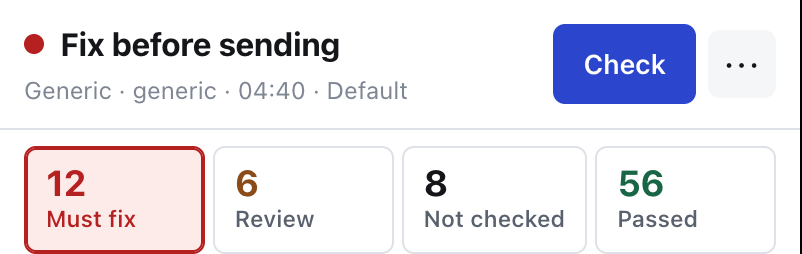
Verdict Fix before sending with twelve must-fix findings.
fix-required — a critical finding exists, and it outranks everything else.
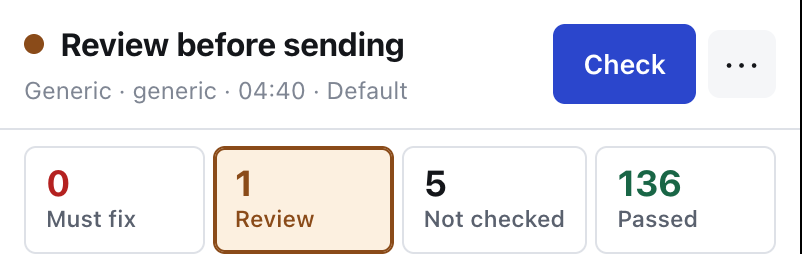
Verdict Review before sending with one warning and five checks not run.
incomplete with warnings present, shown as “Review before sending”: nothing critical, but five checks did not run.

A report that is still checking URLs shows progress instead of a final verdict, and the local findings are visible while the network work continues.

Section 5

URL status and redirect checks

These two rules are the only ones that need the network. Destination URLs — and only destination URLs — are sent to the URL status service at emaillinkchecker.shelfcompass.com. The email itself never leaves the browser.

Some links are removed before a request is ever created: anything recognised as unsubscribe, preferences or a one-time-token action, and anything with embedded credentials. Automatically visiting an unsubscribe URL would unsubscribe the person whose test copy you are checking, so it is not done. Those links come back marked skipped, which is an unverifiable outcome with the reason attached.

link.http-status

What it checks. The HTTP status of the final response for each web link.

  • passed The final response carried a status below 400. The evidence carries the code.
  • critical The target answered with a status of 400 or above — 404, 410, 500 and so on. Also critical when the request was blocked by the service's target policy, which happens when a link points at an address the checker refuses to fetch.
  • warning 401 or 403. The page exists but is gated; you have to decide whether recipients will be able to open it.
  • unverifiable 429 (rate limited by the target); the target timed out; the target was unreachable; no final response was produced because of a redirect limit or loop; the checking service itself failed; the browser was offline; you cancelled; the quota was exhausted; the link was deliberately skipped; or the URL check has not been run yet.

How to fix. A critical here is about your link — fix or replace the destination. An unverifiable here is about the check, not about your link; re-run it, or open the URL yourself. The two are deliberately never merged.

link.redirects

What it checks. The redirect chain from the address in the email to the page the recipient actually lands on.

  • passed The chain resolved. The evidence shows either the final URL when there was no redirect, or the full chain when there was. A redirect is not a defect by itself — every ESP click-tracking link is one — but you should be able to see where it ends.
  • critical A redirect loop. The link never arrives anywhere.
  • warning The redirect limit was reached. The chain is longer than the checker will follow; the evidence shows the chain it did follow.
  • unverifiable The target timed out or was unreachable; the request was blocked by target policy; the service was unavailable, offline, cancelled or out of quota; the link was skipped; or redirects have not been checked yet.

How to fix. For a loop, fix the redirect rule on your side or point the email at the final address directly. For a limit warning, shorten the chain — every extra hop is latency and one more thing that can break between now and the click.

Section 6

UTM checks

Four rules plus one destination rule. Operational ESP links — unsubscribe, preferences, "view in browser" — are excluded from campaign UTM expectations, because campaign tagging does not apply to them. If nothing applicable remains, the set returns one unverifiable finding (utm.set.empty).

The default profile requires and expects consistency for utm_source, utm_medium and utm_campaign, and excludes the path segments unsubscribe, preferences, preference-center and manage-preferences.

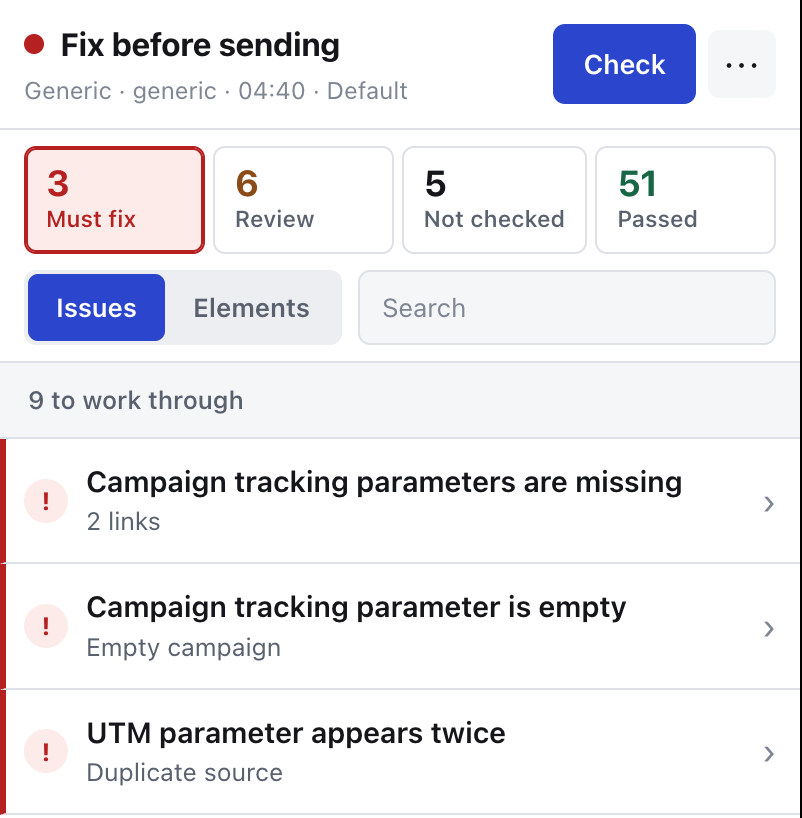
Findings for an email with missing, empty and duplicated UTM parameters.
Missing, empty and duplicated parameters, each as its own finding. A parameter absent everywhere becomes one campaign-wide line, not one per link.
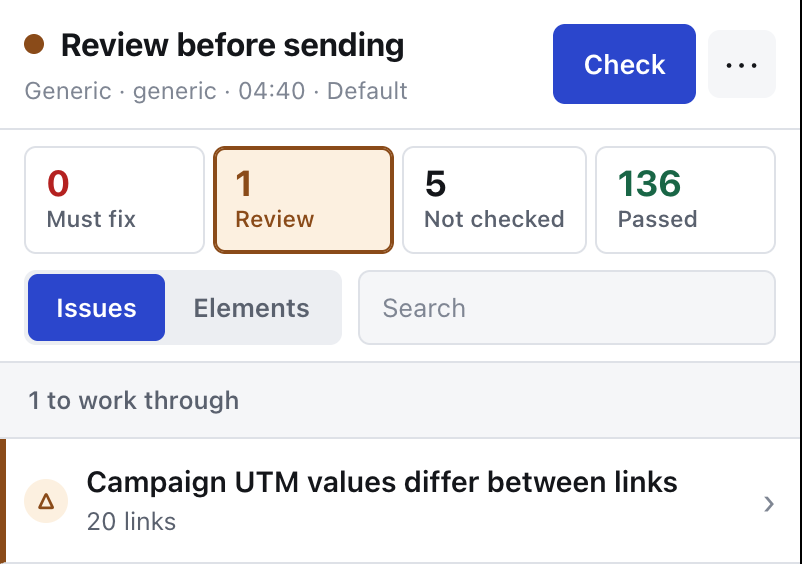
A report whose only finding is inconsistent campaign UTM values across twenty links.
utm.consistency on a real campaign: 136 checks passed, one warning covering all twenty links.

utm.required

What it checks. That every required parameter is present, with a value, on every applicable link. Absence is a property of the campaign rather than of one link, so a parameter missing everywhere becomes one campaign-wide finding with all affected links attached.

  • critical The parameter is present but its value is empty. Or the parameter is simply absent and nothing in the artifact suggests the platform will add it.
  • unverifiable The platform can add the parameter on send, but only when campaign tracking is enabled — and whether it is enabled is not visible from the email screen. Or the campaign tracking settings were not visible at all in this editor, in which case the finding carries the platform's own explanation of where to look.
  • unverifiable No required parameters are configured in the profile, or there are no applicable links.
  • passed Every required parameter is present with a value on that link.

How to fix. Add the parameter, or turn on campaign tracking in your ESP and confirm it there rather than assuming. This rule deliberately refuses to promise that a parameter will appear on send when it cannot see the setting that would add it.

utm.integrity

What it checks. The mechanical soundness of the parameters that are present.

  • critical The same parameter appears more than once on one link. Which value wins is up to the receiving analytics tool, so the attribution is not determined by you.
  • warning The value contains whitespace or a raw +. The value contains a broken percent-escape; the evidence gives the sequence and offset. A relevant UTM parameter appears in the URL fragment instead of the query string, where most analytics tools will never see it.
  • passed Relevant parameters are present on the link and none of the above defects were found.
  • unverifiable No applicable links, or no relevant parameters were found to inspect.

How to fix. Remove the duplicate. Replace spaces with a separator your reporting can group on. Move fragment parameters into the query string, before the #.

utm.allowed-values

What it checks. Whether observed parameter values are in the allowed set defined in your profile.

  • passed The value is in the allowed list. The evidence names the parameter and the permitted values.
  • warning The value is outside the allowed list.
  • unverifiable No allowed-value policies are configured; a policy exists but its list is empty; the parameter never appeared on any link so no value was seen; or there are no applicable links.

How to fix. Either correct the value or extend the allowed list. The default profile ships with no allowed-value policies, so this rule is unverifiable until you configure one.

utm.consistency

What it checks. Whether a parameter carries the same value across the whole campaign. At most one finding per parameter.

  • passed Every link that carries the parameter carries the same value.
  • warning The values differ. The finding distinguishes a case-only mismatch (Newsletter versus newsletter) from a genuine value mismatch, and the evidence shows the full distribution, such as utm_campaign: spring=6, spring-sale=1.
  • unverifiable No consistency parameters configured; no applicable links; or the parameter appeared with no usable single value on any link.

How to fix. Pick one spelling and one case, and apply it everywhere. A case-only mismatch splits one campaign into two rows in most analytics tools.

utm.destination

What it checks. Nothing on its own — it reports a state. In inbox mode the links are ESP click-tracking wrappers, so UTM parameters have to be judged against the confirmed final destination rather than the wrapper.

  • unverifiable The URL status check has not yet confirmed the destination behind the wrapper. One finding covers all affected links.

How to fix. Run the URL check, or wait for it to finish. Until the destination is confirmed, a missing UTM parameter is not escalated to critical, because the parameter may well be on the far side of the wrapper.

Section 7

Merge tag and dynamic content checks

Three rules. They read six kinds of surface: visible text, href, image src, image alt, subject and preheader. When the platform does not expose subject or preheader, the set reports that once (personalization.set.subject-unavailable / personalization.set.preheader-unavailable) instead of letting three rules each repeat it.

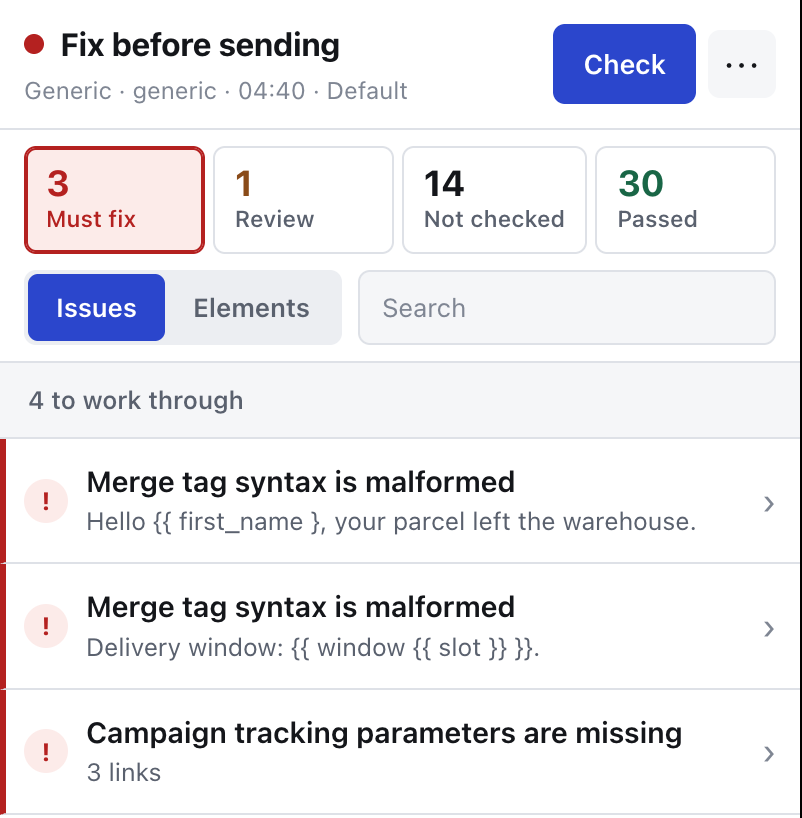
Findings for malformed merge tags left in an email.
Malformed merge tags are critical wherever they appear: no platform will substitute an unclosed or nested token.

personalization.unresolved

What it checks. Merge tokens that are still literal text. The decision uses exactly three inputs: the shape of the token, whether the artifact came from an editor or a delivered message, and whether the syntax belongs to the platform in question. Platform names are never hard-coded into the rule — ownership comes from a syntax dictionary.

  • critical A malformed token — unclosed or nested. No platform will substitute it, so the editor-versus-inbox distinction does not apply.
  • critical A literal token in a delivered message. It is already in the recipient's inbox and will never be substituted now.
  • critical A token whose syntax belongs to a different platform than the one the artifact came from. The evidence names both sides and, when the syntax is shared, lists every platform that uses it rather than inventing one owner.
  • unverifiable A native token in an editor: substitution can only be verified in a delivered message. Or the syntax owner cannot be determined. These are collapsed to one finding per surface kind, with the tokens listed and the elements attached.
  • unverifiable A surface could not be decoded because of broken percent-encoding — what is hidden inside it is unknown, and "no tokens found" would be a lie.
  • passed Surfaces were scanned and no merge tokens were found. The evidence states how many surfaces were scanned.

How to fix. For a critical in a delivered message, the template did not render — check the merge tag spelling and whether the field exists on the profile. For a foreign-syntax critical, you have pasted a block from another ESP; rewrite it in the syntax of the platform you are actually sending from. To confirm the unverifiable editor cases, use Test Inbox and check the delivered message.

personalization.dynamic

What it checks. Conditional and loop constructs. The tool never claims that your business logic is correct — asserting that a "VIP customers only" block will show to the right people would require profile and event data the extension does not have and will not ask for. A dynamic construct therefore never receives passed in any mode.

  • critical A provider grammar error in the construct itself.
  • critical A literal control block in a delivered message — the template engine did not run at all.
  • critical A tag that renders a complete link used where a URL is expected. It cannot work in an href.
  • warning A tag that renders only a URL used outside an href or image source, where it will print a bare address into the copy.
  • unverifiable A control construct in an editor artifact: the extension has no profile or event data, so nothing definite can be said.
  • passed Surfaces were scanned and contain no dynamic blocks at all. This is a verified fact about absence, not a promise about logic.

How to fix. Fix grammar errors in the template. Move full-link tags out of href and URL-only tags into it. For the logic itself, send yourself the variants — no static analysis can substitute for that.

personalization.empty-substitution

What it checks. Visible traces of a substitution that resolved to nothing — Hi , with the name gone. This is the only heuristic in the personalization set, which is why it is a separate rule you can disable in your profile without touching the deterministic checks. It looks only at surfaces a recipient reads: an orphaned comma inside an href means nothing.

  • warning Punctuation follows a marker with nothing in between. It is a warning, not a critical: the email is delivered and readable, only the greeting is spoiled.
  • passed Visible surfaces were scanned and no such sign was found.
  • unverifiable The artifact has no visible text.

How to fix. Give the merge tag a default value in your ESP, or rewrite the sentence so an empty value still reads correctly. In an editor preview this can also be an artefact of unrealistic test data rather than a real defect — substitution happens on send.

Section 8

Compliance and content checks

Nine rules covering the things that make an email unsendable rather than merely imperfect.

compliance.copy-placeholder

What it checks. Draft text that was never replaced. The literal patterns are lorem ipsum, TODO, FIXME, XXX, PLACEHOLDER and insert text here. Only visible text blocks are scanned.

  • critical A pattern was found. The evidence carries the surrounding snippet and the pattern that matched.
  • passed Visible text was scanned and none of the patterns appear.
  • unverifiable The artifact has no visible text.

How to fix. Write the copy. If one of these strings is genuinely part of your content — a product literally called XXX — add it to the ignored placeholder strings in your profile.

compliance.reserved-domain

What it checks. Links pointing at the IANA reserved example domains: example.com, example.org, example.net. Exact host match only, so a real domain that merely contains the word is not flagged.

  • critical A link points at a reserved example domain.
  • passed Web links were checked and none do.
  • unverifiable There are no web links.

How to fix. Replace the placeholder with the real destination.

compliance.cta

What it checks. Visible call-to-action links — the buttons the campaign exists for.

  • critical The CTA has an empty label, so there is nothing to click on. Or the CTA has no destination.
  • passed The identified CTAs have both a label and a destination, or there is no CTA in the email.
  • unverifiable The artifact contains no links.

How to fix. Give the button text and a URL. An empty-labelled button usually means the text sits in an image that failed to be recognised, which is worth fixing for accessibility anyway.

compliance.unsubscribe

What it checks. Whether a working unsubscribe or preferences surface exists. Recognition uses visible labels, linked-image alt text and URL tokens across several languages, and only strong signals count. Unsubscribe links are never visited automatically.

  • passed At least one recognised surface has an active destination.
  • critical No recognised surface at all in a delivered message. A recognised surface whose destination is missing. A recognised surface whose destination is still a placeholder or is unresolved, in a delivered message.
  • unverifiable No recognised surface in an editor preview — many ESPs only inject the footer on send. A recognised surface whose destination is a placeholder in an editor.

How to fix. In the editor, confirm your ESP is configured to add the footer, then verify it with Test Inbox rather than assuming. In a delivered message, a critical here is a legal problem, not a formatting one.

compliance.subject

  • critical The subject is available and empty.
  • passed The subject is available and non-empty.
  • unverifiable The platform does not expose the subject on this screen. The finding carries the reason the adapter gave.

How to fix. Write the subject. If it is unverifiable, open the screen where your ESP keeps it, or confirm through Test Inbox.

compliance.preheader

  • warning The preheader is available and empty. Inboxes will fill the space with whatever text comes first in the email.
  • passed The preheader is available and non-empty.
  • unverifiable The platform does not expose the preheader here.

How to fix. Write one. It is the second line of the subject as far as the recipient is concerned.

compliance.image-source

What it checks. Whether every visible image will actually load for the recipient.

  • critical The source is empty. The source is local — a file: style reference that exists only on your machine. The source is relative, and an email has no base URL.
  • warning A data URI larger than the 102 KiB Gmail HTML budget. An http:// image source inside an HTTPS email (mixed content). Missing or invalid width / height attributes, which cause layout jumps in clients that block images by default.
  • unverifiable The source is a merge placeholder. Or the platform did not provide the original source for one or more images.
  • passed Visible images were checked and no defect was found; or the email has images but none are visible.
  • unverifiable The artifact contains no images.

How to fix. Upload the image to your ESP or CDN and use the absolute HTTPS address. Always set width and height.

compliance.image-link

  • critical A visible linked image has no destination. Hero images are clicked more than the button underneath them, and a dead one is silent.
  • passed Linked images all have destinations, or the email has no linked images.
  • unverifiable The artifact contains no links.

How to fix. Link the image to the same destination as its CTA.

compliance.gmail-clipping

What it checks. The HTML size of the artifact against a 102 KiB budget. Above that, Gmail clips the message and shows a "View entire message" link — which usually hides your footer, and with it your unsubscribe link. The budget is dated in the report so you can see when it was last verified.

  • warning Over budget. The evidence gives measured bytes against the threshold.
  • passed Within budget, in a delivered message.
  • unverifiable Within budget, but measured in an editor: the editor HTML is not the final HTML, so this is not a promise about what Gmail will receive. Also unverifiable when the size could not be measured at all.

How to fix. Cut inline CSS, remove commented-out blocks, and replace large data URIs with hosted images. Confirm the final size with Test Inbox, since the editor number is only indicative.
Section 9

Accessibility checks

Four conservative rules. There is no accessibility score and no WCAG grade — an opaque number is exactly the kind of false comfort this tool refuses to produce. The set can be disabled in the profile, and when it is, the disabled rule identifiers are reported explicitly rather than silently omitted.

accessibility.image-alt

What it checks. Alternative text on content images. Images with an explicit decorative signal are skipped, as are hidden images.

  • warning No alt attribute at all. An empty alt with no explicit decorative signal, which is ambiguous rather than intentional. An alt that just repeats the filename. An alt longer than 150 characters, which is difficult to navigate with a screen reader.
  • passed Every visible content image has usable alternative text.
  • unverifiable The artifact contains no images.

How to fix. Describe what the image communicates, not what it depicts. For a purely decorative divider, mark it decorative explicitly so the intent is visible in the markup.

accessibility.link-name

What it checks. Whether each visible link has an accessible name, taken from a limited set of sources: visible text, the alt text of a linked image, aria-label, or title.

  • warning The link has no name from any of those sources. Or the name is generic — click here, learn more, read more — and no better alternative name exists on the element. Links sharing a reason are grouped into one finding.
  • passed Every visible link has an accessible name.
  • unverifiable The artifact contains no links.

How to fix. Name the destination in the link text: "See the spring collection" rather than "Learn more". Screen reader users often navigate by pulling up a list of links with no surrounding sentence.

accessibility.language

  • warning The document root is available but declares no language, so assistive technology has to guess the pronunciation.
  • passed A language is declared. The evidence quotes it.
  • unverifiable The document language could not be read; the finding carries the reason.

How to fix. Set lang on the root element of your template. Most ESP templates have a setting for this.

accessibility.heading-outline

  • warning The visible heading sequence skips a level. The evidence shows the whole sequence, such as h1 → h3, and the finding points at the heading where the skip occurs.
  • passed The sequence skips no level — including the case where the email has no semantic headings at all, which is stated explicitly.
  • unverifiable The heading sequence was inconsistent with its snapshot targets and could not be evaluated.

How to fix. Use consecutive levels. Choose the heading level for structure and control the size with CSS.

Section 10

Spelling check

grammar.spelling

What it checks. English spelling in the subject, preheader and visible text, against a dictionary bundled with the extension. Nothing is sent anywhere and no language model is involved. Template syntax is stripped before scanning, so merge tags are not reported as misspellings, and detected proper nouns are left alone. The platform terms Mailchimp, Klaviyo, Gmail, Outlook, Intuit, Yahoo, unsubscribe and preheader are always accepted, plus every term in your profile.

  • warning A word is not in the dictionary. When there is a useful suggestion, the evidence offers it; otherwise it simply states the word is unknown. It is always a warning — a dictionary miss is not proof of an error.
  • passed The English surfaces were checked locally and every word was recognised. The evidence states how many surfaces were checked.
  • unverifiable The email language could not be determined, or it is not English. Local spelling is only available for English, and pretending otherwise would flag an entire German newsletter as misspelled.

How to fix. Correct the word, or add your product names and brand vocabulary to the allowed terms in your profile so they stop appearing.

Section 11

Browser preview checks

The extension can render the email in a sandbox with scripts and remote resources blocked, at two viewports: desktop browser at 720 × 900 and mobile browser at 390 × 844. Every preview carries a permanent rendering.email-client.unverifiable note stating that a browser preview does not claim Outlook, Gmail or native email-client compatibility. That note is part of the output, not a disclaimer buried in marketing copy.

  • critical rendering.horizontal-overflow — the rendered width exceeds the viewport, so the recipient gets a horizontal scrollbar or a shrunken email. The finding gives both numbers.
  • critical rendering.unsafe-html — a script, form, iframe, object or embed is present. Email clients strip these, and the safe preview disables them too.
  • warning rendering.hidden-content — substantial blocks of content are hidden by HTML or inline CSS. Sometimes deliberate (a preheader spacer), sometimes a block someone hid instead of deleting.
  • warning rendering.css-compatibility — client-sensitive CSS was found: display:grid, position:fixed, or CSS custom properties. Support for these varies widely across email clients.
  • passed rendering.browser-preview.passed — no deterministic browser-preview issue at that width.

How to fix. Constrain the widest element to the viewport — usually a table, a wide image or a long unbroken URL. Replace grid layouts with table layouts and custom properties with literal values.

Section 12

Test Inbox

The only way to check what was actually delivered rather than what the editor promised. It is a separate, explicit workflow, not something the extension does in the background.

You ask for an address

The extension requests a short-lived, unguessable email address and an access token from the service. It sends capability-management commands only — never your page, HTML, subject, preheader, snapshot or raw message.

You send a test to it

You, or your ESP's own "send a test" feature, send the campaign to that address. Nothing arrives unless you explicitly send it.

The service holds the message briefly

The raw MIME is stored encrypted at rest with AES-256-GCM, capped at 10 MiB, and released only against the Bearer capability the extension holds. Retention is one hour, after which it is inaccessible; deleting the capability deletes it immediately.

The extension analyses it locally

The raw message is downloaded over HTTPS as a bounded stream, oversized or malformed responses are rejected, and everything is parsed inside the browser. The raw message is not persisted. Only compact facts are stored.

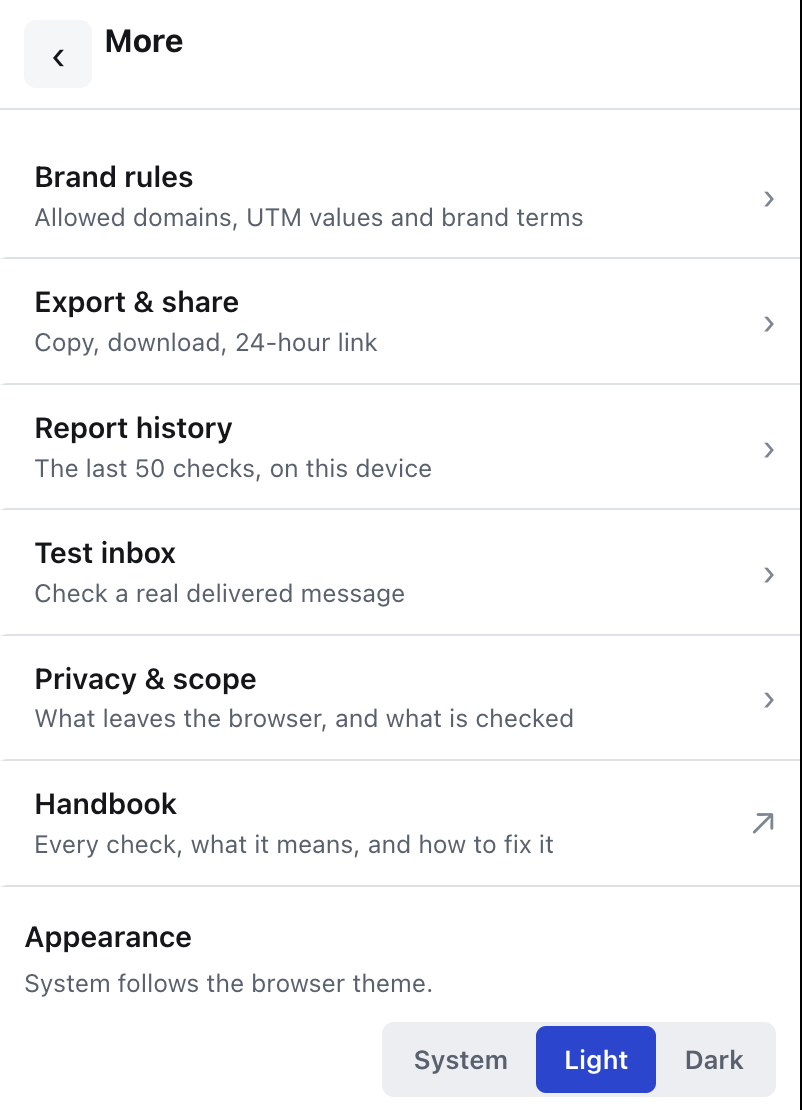
The More menu with brand rules, export, history, test inbox, privacy and handbook.
Everything beyond the report list lives under “More”.
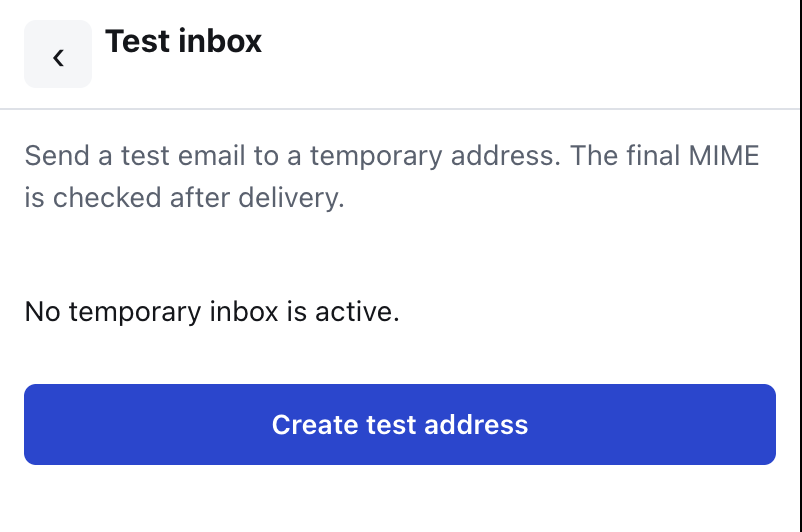
The Test inbox screen before an address has been created.
Nothing exists until you ask for it: no address, no message, no traffic.

What the delivered message tells you

Six facts, each with its own status:

  • MIME structure — how many parts parsed within the bounded limits.
  • Delivered body — which body part was selected, and why.
  • Attachments and CID — attachment count, inline CID resource count, and any duplicate Content-ID.
  • List-Unsubscribe — whether a valid HTTPS one-click header pair is present, and what is wrong if not.
  • Authentication — SPF and DMARC. Without cryptographic verification these are only the receiving MTA's own observations, and the report says so in those words.
  • DKIM — signatures verified cryptographically inside the extension, with alignment against the From domain.

DKIM verification needs public keys, so the extension sends bounded DKIM and DMARC DNS TXT query names — at most twelve per check — to the authentication endpoint. Raw MIME, headers, subject and body are never sent there. A DNS failure is reported as unverifiable, never as a sender defect: "we could not look up the key" is not the same news as "your signature is invalid".

Once the delivered body is available, the selected decoded HTML or text moves once from the extension's background worker to its trusted side panel so the final links, UTM parameters, redirects and HTTP status can be checked against what really shipped. A page content script cannot request that data, it is never stored, and only destination URLs can leave the browser afterwards.

Section 13

Editor to inbox diff

Having both an editor snapshot and a delivered message lets the extension compare them. The comparison is pure and deterministic: it reads no DOM, calls no API and touches no network.

It reports four kinds of change: subject changed, preheader changed, destination changed for a link that exists on both sides, and links added or removed between the two. If the two snapshots are too dissimilar to be the same email, the result is not-comparable with the reason stated, rather than a flood of imaginary changes. An incomplete inbox snapshot never turns a missing element into a false deletion.

The diff also carries verification forward. When the editor could only say unverifiable about a missing required UTM parameter — because campaign tracking was not visible on that screen — and the delivered message proves the parameter is genuinely absent, the finding is escalated from unverifiable to critical or warning. This is the honest ordering: the grey status was never a pass waiting to be forgiven, it was a question, and the delivered message answers it.

Section 14

Shared reports

Sharing a report is optional, requires an explicit scope confirmation before anything is uploaded, and uploads a deliberately reduced payload.

What goes up: the verdict, the status counts, the source platform and mode, the profile name, the capture time, and the critical, warning and unverifiable findings with their rule identifiers, redacted evidence and up to twenty target labels each.

What does not: the email HTML, the details of passed findings, DOM references, recipient-token query values, and unsubscribe or preferences URLs. Sensitive query keys — tokens, codes, keys, signatures, session identifiers — are redacted out of every URL that does travel, and the service validates the same restriction again on arrival rather than trusting the client.

How long it lives: 24 hours behind an unguessable capability URL on emaillinkchecker.shelfcompass.com. The page is marked noindex. The extension keeps a separate delete capability, so you can remove the report immediately instead of waiting for it to expire.

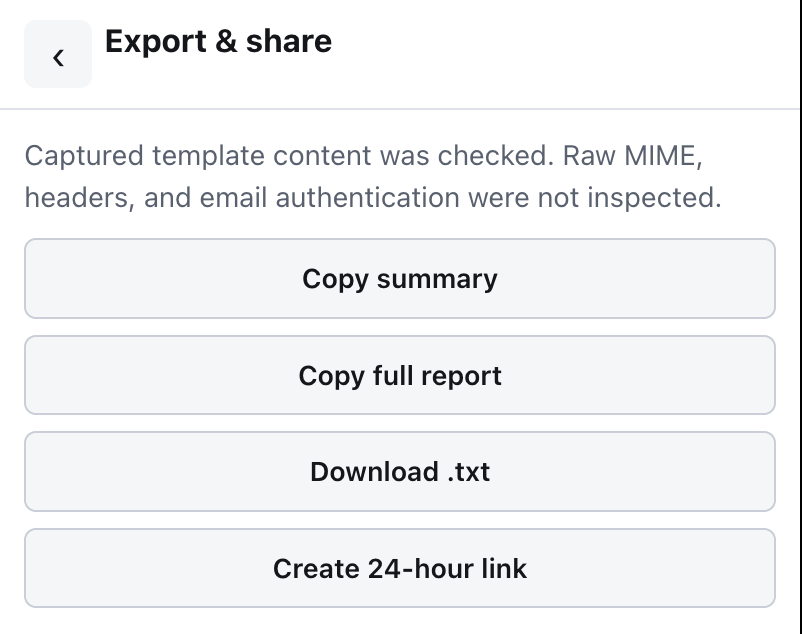
The Export and share screen with copy, download and 24-hour link actions.
Copy and download stay on the device. “Create 24-hour link” is the only action that uploads anything, and it says what was checked before you press it.

The intended use is handing a reviewer or a client the actionable part of a report without handing them the campaign.

Section 15

Supported platforms and limits

A platform is only claimed as supported when a working adapter exists for it. The adapter's job is narrow: find the email preview on the page and judge how complete it is, read the subject, preheader and visible message settings, translate that platform's merge syntax into the shared format, and explain what the platform does not expose. Adapters contain no rules and draw no UI, and one adapter breaking does not affect the others.

Supported

  • Gmail — the message open in mail.google.com.
  • Mailchimp — the campaign editor.
  • Klaviyo — the campaign editor.
  • Generic — a selected-email workflow on any other page, with whatever the page actually exposes. Anything the page does not give up is reported as unverifiable, not assumed.

Explicitly not claimed

These are absent on purpose, and the absence is part of the product's honesty rather than a roadmap gap to read between the lines of:

  • Outlook Web support. No adapter, so no claim.
  • Native email-client rendering. The previews are browser previews at two viewports, and every preview says so in its own output.
  • Inbox placement or spam-folder prediction. Not measured, not estimated.
  • A deliverability score. No number is produced, because a number here would be a guess dressed up as a measurement.
  • Guaranteed inbox delivery. Nobody can offer this.
  • Subjective copy quality scoring. The spelling check is a dictionary lookup, not an opinion about your writing.

The extension also never sends, schedules or modifies your campaigns, never reads your other messages, and never opens unsubscribe, preferences or one-click action links on your behalf.

Section 16

Glossary

UTM parameter

A query-string parameter — utm_source, utm_medium, utm_campaign and friends — appended to a link so analytics can attribute the visit to the campaign that produced it. Wrong or missing ones do not break the email; they break next month's reporting, quietly and irreversibly.

Merge tag

A placeholder in the template that the platform replaces with real data at send time, written in that platform's own syntax. A merge tag still visible as literal text in a delivered message means substitution never happened.

Preheader

The short line of text an inbox shows after the subject in the message list. If you leave it empty, the client fills the space with whatever text comes first in your email — often "View in browser".

DKIM

DomainKeys Identified Mail. The sending server signs the message with a private key; the receiver fetches the matching public key from DNS and verifies the signature, proving the message was not altered in transit and really came from a server authorised by that domain. The extension verifies signatures cryptographically rather than trusting the receiving server's summary header.

SPF

Sender Policy Framework. A DNS record listing which servers may send mail for a domain. In this tool SPF appears as evidence observed by the receiving mail server, and is labelled as such rather than presented as an independent verification.

DMARC alignment

DMARC ties DKIM and SPF back to the domain the recipient actually sees in the From header. Alignment is the question of whether the domain that passed DKIM or SPF matches that visible domain. A message can pass DKIM and still fail DMARC, if the signature belongs to a different domain than the one in From.

Redirect chain

The sequence of hops between the address written in the email and the page the recipient finally lands on. Click-tracking links always add at least one hop. The chain matters because every hop can break independently, and because the UTM parameters that survive to the end are the ones your analytics will see.

Test Inbox

A temporary, unguessable email address issued on request so you can send yourself the real campaign and have the delivered message analysed. The raw message is held encrypted for one hour and never uploaded by the extension — it arrives from your own ESP.

Shared report

A redacted, 24-hour, noindex capability link containing the actionable findings of a report and nothing else — no email HTML, no passed details, no recipient tokens, no unsubscribe URLs.

Snapshot

The normalised representation of the email that rules run against: links, images, headings, text surfaces, subject and preheader, plus what the platform admitted it could not provide. It is the only contract between the platform adapters and the rules, and it never leaves the browser.

Evidence

The concrete thing a finding is about — the raw href exactly as written in the email, the parameter and its value, the offending word, the position of a broken escape. Findings are never allowed to describe a problem without showing what produced it.

Email Link Checker

Nothing here turns green on missing data.

That single rule is the reason the report is worth reading five minutes before a send.